

Currency convertor using Excel
One of the most time-wasting problems at my former job was to get the currency match for a list of dates. I came up with a solution to this problem by using VBA, the programming language of the office suite.
Since I am from Romania, the official RON currency rates are published by the National Bank of Romania(BNR) and all I had to do was to access the records.
The currency lists are grouped by years in XML files:
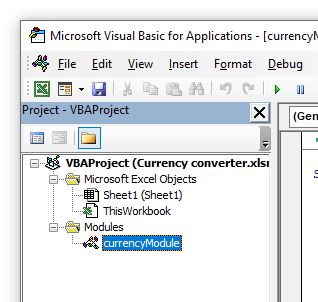
I added a new module in the Visual Basic editor window(Alt + F11):
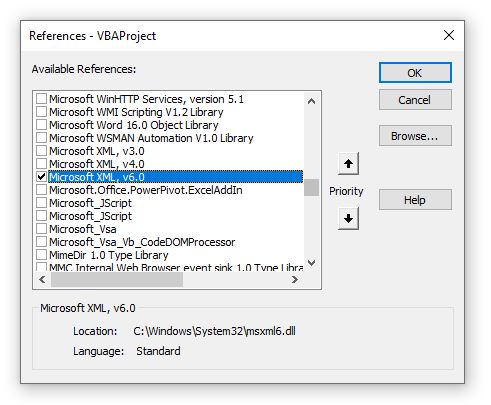
A reference to the Microsoft XML library is needed since we're gonna be dealing with XML file format:
And here is the function that reads the XML file, searches for the given currency symbol, and returns the rate. Putting that in the currencyModule and we're good to go:
Public Function CURS(Data As Date, Symbol As String) As String
    '### LOAD XML
    Dim XMLDoc As MSXML2.DOMDocument60
    Set XMLDoc = New MSXML2.DOMDocument60
    XMLDoc.async = False
    XMLDoc.validateOnParse = False
    XMLDoc.SetProperty \"SelectionNamespaces\", \"xmlns:ns='http://www.bnr.ro/xsd'\"
    XMLDoc.Load (\"https://www.bnr.ro/files/xml/years/nbrfxrates\" & Year(Data) & \".xml\")

    '### CHECK DATE
    Dim currencyDate As String, currencyValue As String
    If IsDate(Data) Then
        currencyDate = Format(Data, \"yyyy-mm-dd\")
    Else
        CURS = \"#VALUE\" 'currency date is invalid
        Exit Function
    End If

    '### GET CURRENCY BY DATE
    If XMLDoc.SelectNodes(\"/ns:DataSet/ns:Body/ns:Cube[@date='\" & currencyDate & \"']/ns:Rate[@currency='\" & UCase(Symbol) & \"']\").Length > 0 Then
        currencyValue = XMLDoc.SelectNodes(\"/ns:DataSet/ns:Body/ns:Cube[@date='\" & currencyDate & \"']/ns:Rate[@currency='\" & UCase(Symbol) & \"']\").Item(0).Text
    Else
        CURS = \"#N/A\" 'currency for that date not found
        Exit Function
    End If
    CURS = currencyValue
End Function
Making the function Public makes it possible to be used inside the workbook cells, like a normal formula:
=CURS(\\\"2021-10-01\\\",\\\"EUR\\\").
The XMLDoc.SelectNodes function gets the XML node value that matches the XPath string, in this case:
DataSet->Body->Cube[@date]->Rate[@currency]
You can download the Excel file here. Keep in mind you need to have macros enabled for it to work.
About the author
I am a front-end developer experienced working with React and Typescript.
So far I worked with product owners from multiple areas such as education, supply chain management, event planning, and product startups.
Before joining the front-end world, I worked as a data analyst, using Excel and Excel VBA as my daily drivers. I also had the opportunity to work as a network administrator where I learned how to build and configure Linux servers.
Comments
Join the discussionNo comments yet. Be the first to comment.